
Chorus · Focused listening
Word-level subtitles for language listening practice
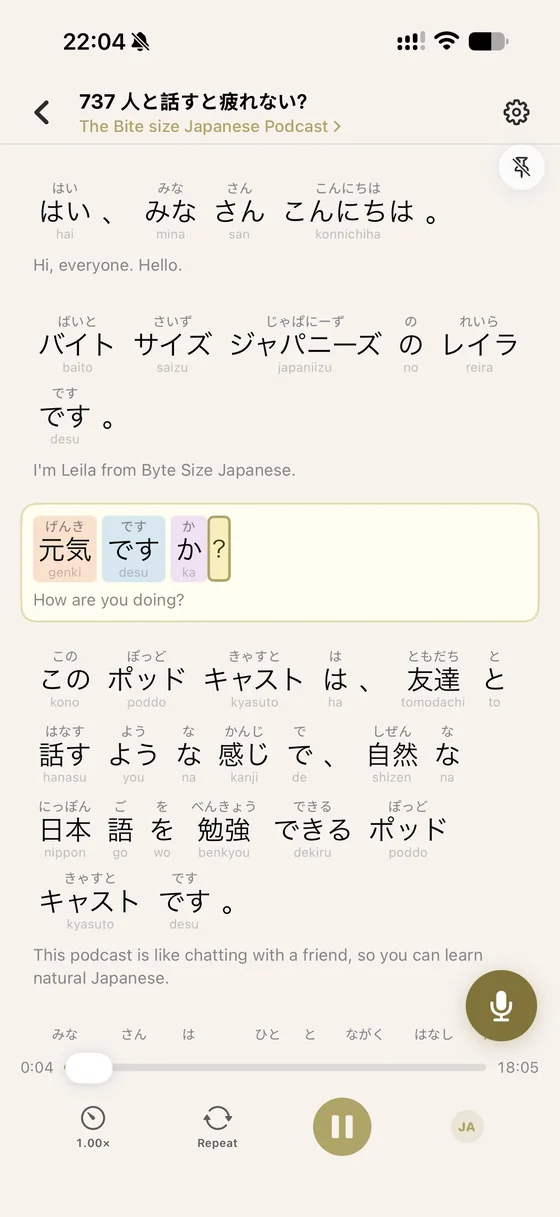
Word-level subtitles are most useful after you have tried to listen without text. They let you find the precise word or sound that did not match what you expected, then hide the text and test your hearing again.
This method is for learners who understand written sentences but struggle to recognise the same words in connected speech.
A practical Chorus workflow
Listen with the text hidden
Give your ears the first attempt and notice where the sentence becomes unclear.
Reveal the exact timing
Use the highlighted words to compare the sound with the sentence you expected to hear.
Remove the support again
Replay without text and say the sentence aloud so the sound, meaning, and speaking pattern connect.
A diagnostic tool, not permanent support
The word highlight follows the audio while translations and reading aids remain available only when you need them.
What to keep in mind
- Word-level timing cannot make unsuitable material comprehensible.
- Always-visible text can encourage reading instead of listening.
- Automatic subtitles may occasionally need correction, especially with noisy audio.
Frequently asked questions
Are word-level subtitles better than normal subtitles?
They are better for diagnosing the exact point where listening failed. Normal sentence subtitles may be enough when you only need the overall meaning.
Should I show a translation at the same time?
Try the target-language sentence first. Open the translation only when the sentence remains unclear.
Which languages can I study?
Chorus is designed for multilingual listening practice; available recognition and learning support can vary by audio and language.
Turn your next listen into a lesson.
Try the listening, explanation, and Echo workflow in Chorus.
Chorus on the App Store →